Free LAS file viewer for oil and gas well logs
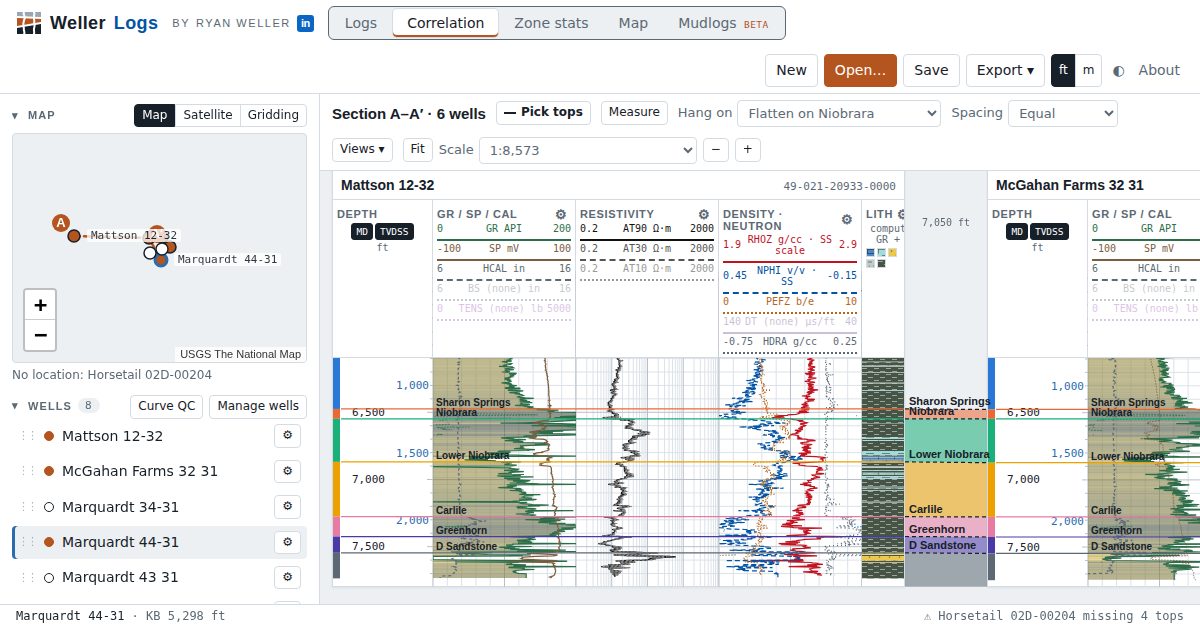
Drop a LAS file on the page and see the logs on standard tracks in seconds. Weller Logs runs in your browser: nothing to install, no license server, and the files are read on your own computer.
Open Weller Logs, freeRead the methods
What is a LAS file?
LAS (Log ASCII Standard) is the plain-text format the Canadian Well Logging Society defined for digital well logs, and the most common way oil and gas well logs are shared between operators, service companies and state agencies. A LAS file has named sections that start with a tilde:
| Section | What it holds |
|---|---|
~V Version | LAS version (1.2, 2.0 or 3.0) and whether data lines wrap |
~W Well | Well name, API/UWI, operator, location, start and stop depth, step, null value |
~C Curve | Each curve's mnemonic, unit and description: GR, RHOB, NPHI, ILD… |
~P Parameter | Run parameters: bit size, mud resistivity, bottom-hole temperature, elevations |
~O Other | Free text: remarks, and sometimes a directional survey |
~A ASCII data | The depth-indexed values, one row per depth step |
Because it is plain text, you can open a LAS file in any text editor, but a column of 9,000 numbers is not a log. A viewer turns it into tracks on a depth scale so you can read the rocks.
How to open a LAS file in Weller Logs
- Open Weller Logs in Chrome, Brave, Edge or Firefox on a computer.
- Click Open… or drag one or more
.lasfiles anywhere onto the page. - Read the load summary: one card per well says what came in, which curves landed on which tracks, and anything that needs a decision (a missing KB, two gamma-ray curves, a header that disagrees with the data).
- Scroll and zoom the log. The scale is a print ratio, so 1:240 is 5 inches per 100 feet, as on a paper log.
- Save the project as a
.lasprojfile. It holds the LAS data, tops, tracks and settings, so it opens complete on another computer.
What it reads
- LAS 1.2, 2.0 and 3.0, including wrapped data, LAS 3.0 log, tops and inclinometry sections, and comma or tab delimiters.
- Wireline, LWD/MWD and mud logs. Common vendor mnemonics are recognized: array resistivity, spectral gamma ray, density and neutron porosity on limestone, sandstone or dolomite, gas and chromatograph curves, mud-log lithology percentages, and cased-hole cement-bond curves.
- Messy real-world files. Run-together values like
-999.25-999.25, comma decimal marks, text nulls, header lines missing their period, bottom-up logs and implausible KB elevations are handled and reported, not silently guessed. - Several files for one well. Logging runs with the same API number are merged onto one depth grid; overlapping curves from different tools stay separate so you can choose.
- PDF and TIFF mudlogs (beta), side by side and hung in measured depth.
A file that will not load says why: a DLIS or Excel file renamed .las, a data row with the wrong number of columns, or a time-indexed log. Each message comes with the line it failed on and a fix.
Where to find free oil and gas well logs
Many state agencies publish well logs for free. Some offer LAS files; many older logs are scanned TIFF or PDF images. Good places to start:
- Kansas Geological Survey: tens of thousands of digital LAS files.
- Wyoming Oil and Gas Conservation Commission: the source of the example wells in Weller Logs.
- Colorado Energy and Carbon Management Commission: well documents, including logs.
- California Geologic Energy Management Division (CalGEM): well records through WellSTAR.
Scanned mudlogs from these sites open in the PDF / raster tab, where you can calibrate depth and pick tops on the image.
Your files stay on your computer
Weller Logs reads LAS files with JavaScript in the browser tab. The logs are not uploaded to a server. That matters for proprietary data: you can look at a confidential well without sending it anywhere. Signing in is optional and only needed to keep projects in the cloud.
Questions
Is Weller Logs really free?
Yes. Opening LAS files, correlation, top picking, petrophysics and exports are free, with no trial period and no sign-up.
Are my LAS files uploaded?
No. Files are read in your browser. Nothing is sent to a server unless you sign in and choose to save a project to the cloud.
Which LAS versions are supported?
LAS 1.2, 2.0 and 3.0 can be read. Export writes LAS 2.0, which most software reads, including the Python library lasio.
Can I export a LAS file?
Yes. Export LAS writes the selected well as LAS 2.0 with the curves as shown (depth shifts, despiking and normalization applied), computed petrophysics curves, tops and the directional survey.
Does it work offline or on a phone?
It installs as an offline web app in Chrome and Brave. It is built for a computer screen; on a phone you can look around, but picking tops and editing tracks need a mouse.
Can it open DLIS files?
Not yet. DLIS is a binary format; convert it to LAS first (most logging vendors and tools such as dlisio can).