Well log correlation in your browser
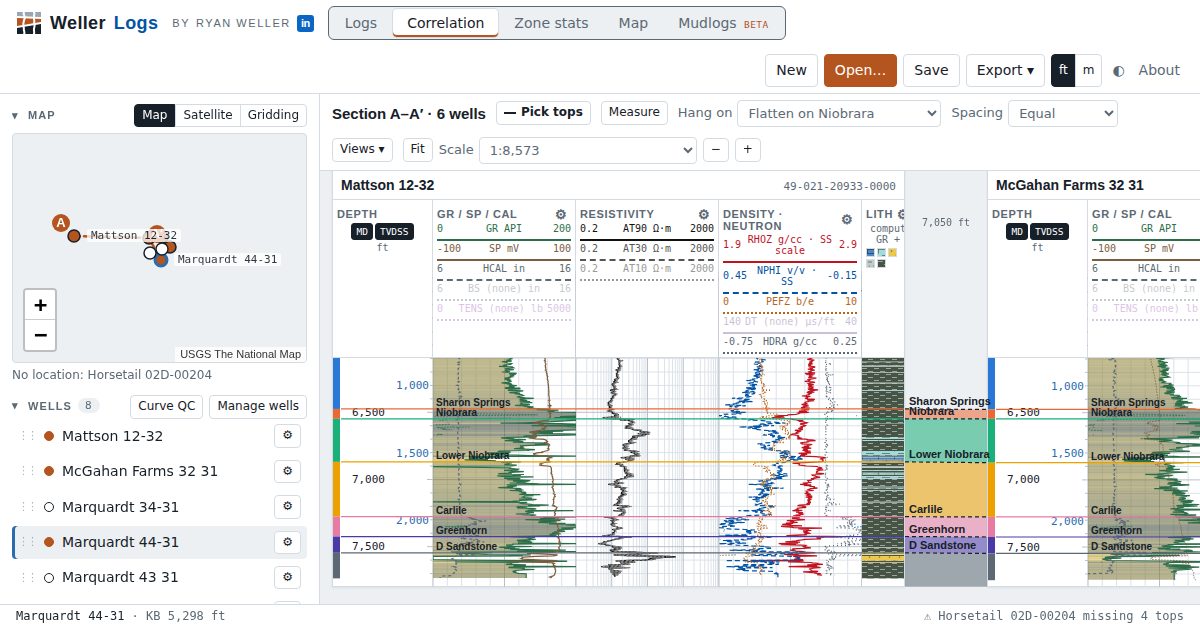
Hang a cross section from LAS files, flatten on a marker, and pick tops across wells by dragging lines. Free, no install, and built by a geologist for the quick correlations that do not need a full interpretation suite.
Open Weller Logs, freeRead the methods
What well log correlation is
Well log correlation matches the same rock layers from well to well using the shapes of their logs: the gamma-ray kick at a shale, the resistivity spike of a tight streak, the density-neutron crossover of a gas sand. Geologists correlate to map formations, find where units thin or pinch out, place faults, and choose landing zones for horizontal wells. The deliverable is a set of formation tops and a cross section that shows them.
Build a cross section in five steps
- Open the LAS files for your wells. Wells with a location appear on the map.
- Add wells to the section with the dot beside each well or a click on the map. The order follows the Wells list, which starts west to east and can be dragged into any line of section.
- Choose the hang. Measured depth (MD), sea level (TVDSS) for structure, or flatten on a top for stratigraphy. The depth track always labels real MD and subsea depth, whatever the hang.
- Pick tops. Press Pick tops (or T), choose or type a top name, and click a log. Drag any top line to move it, or type its MD in the Tops panel. Tops can also be loaded from a CSV or Excel table.
- Check and export. The app warns when tops cross between wells or are missing from one. Export the section as a PNG at print scale, or the tops as CSV.
Structural versus stratigraphic correlation
Hanging on subsea depth shows structure: dip, faults and closures. Flattening on a regional marker, such as a condensed shale or a bentonite, removes structure so you can see stratigraphy: thickening, onlap and truncation between wells. Switch between the two with one menu; both views keep the same tops, so a pick made in one is in the other.
Deviated and horizontal wells
A directional survey in the LAS file, or one loaded from a CSV, text report or Excel file, gives true vertical depth by minimum curvature. Horizontal wells then plot in TVD next to the verticals, so the lateral's gamma ray can be read against the type log it was steered on. The Measure tool reads the true vertical thickness (TVT) of any interval.
From tops to maps
Once tops are picked, the Map tab grids an isopach between two tops, or a structure map on one, from every well that has them. Zone statistics then report gross and net thickness, average porosity and water saturation for each zone and well; see free petrophysics.
Spacing and scale
Wells can be spaced equally or by their real distance, which is labeled on the section. Vertical scale is a print ratio (1:240, 1:600, 1:1200…), and Logs and Correlation keep their own zoom, so detail work and the overview do not fight each other.
Questions
What do I need to start correlating?
LAS files for two or more wells. Elevations (KB or ground level) are needed to hang on subsea depth; location is needed for the map and for spacing by distance. Both can be typed in if the header lacks them.
Can I import tops I already have?
Yes. A CSV or Excel table with well, top and MD columns loads straight onto the wells; the app matches wells by name or API number.
How many wells can a cross section hold?
As many as fit on your screen comfortably, typically 6 to 15. Use saved views to keep several sections of the same project.
Does it handle horizontal wells?
Yes, with a directional survey or a TVD curve. The well plots in true vertical depth so it lines up with nearby verticals.
Can I share a cross section?
Export it as a PNG, or save the .lasproj project file, which includes the log data, tops and section, and send it to a colleague.